Upgrading from Windows 8 to Windows 8.1 Experience

Windows 8.1 has RTM’d! Now that it’s available on TechNet (R.I.P.) and MSDN, I thought I’d try an inplace upgrade from my home Windows 8 Enterprise machine to Windows 8.1 Pro.

The first thing I did after downloading an ISO was to use the Windows 7 USB/DVD Download Tool to make a bootable USB for Windows 8.1 which is incredibly easy. Then after launching the setup.exe from the USB, I was first greeted with a screen asking for a key:

keyA bit strange that an update needs a new key, but once you enter it,  it will run a quick online check before letting you continue.

It’s zero touch from there, it’ll do it’s magic and get to the end, asking you for your Microsoft ID similar to the original Windows 8 way. A very easy upgrade process!

From here on in, it’s going to be a list of issues and comments I had:

  • The first thing I did was run Windows Update – which took about 15 minutes then came back with an error. I tried again and there were updates this time – I’ve done this on a fresh Windows 8.1 build and had similar results, so I’m guessing it’s not something you should do straight away :)
  • Next it didn’t detect my video card properly as I was stuck at a lower resolution and only 1 of my 2 screens, so I had to download the Nvidia graphics driver. There’s already Geforce drivers for Windows 8.1 in beta, so I grabbed them and they seemed to install fine, brining me back to 2 monitor glory.
  • Now that I have a start button, I can right click on it and get a handy menu. Strangely, once this menu is on screen you can’t move your cursor to your other screen… unless you move the cursor really fast! Moving it slow gets you stuck on the edge of the screen, but rapidly move the mouse and your cursor will jump over the other side. Coming back to the first screen is exactly the same, weird!
  • Right clicking on a file in Windows Explorer was fine, but if the contents of the folder you’re in change, the menu disappears. This is rather frustrating if you’ve got a program making changes to files in a folder. I’m hoping this one is a bug.
  • The default bright yellow background I received wasn’t overly pretty, but being able to set the desktop and new Windows 8 interface backgrounds the same makes for a less jarring change between the two modes. You can set this under Taskbar and Navigation properties, Navigation tab, Show my desktop background on start.
  • Also under the Navigation tab is ‘Show Start on the display I’m using when I press the Windows logo key – another good option to enable so the new full screen start menu shows on the screen you’re currently looking at.
  • Having to install all your programs again is a bit annoying (the data of the programs isn’t lost in the upgrade, so you can either install over the top or hopefully just run the exe file depending on the program)
  • Hints pop up randomly telling you how to switch windows or some other tip. A good idea.
  • The latest Java is incompatible with IE11 at the time of writing this (IE11 gives a warning saying “Several add-ons aren’t compatible with Internet Explorer’s enhanced security features and have been disabled”) , but you can still use other browsers.
  • My Computer in Windows Explorer is now called “This PC”. I guess that makes sense, but you can rename it if you don’t like it just as you could before.

That’s all I’ve hit so far, I’ll update this post with any other unexpected or interesting finds.


Adobe Reader Has Stopped Working

Hi,

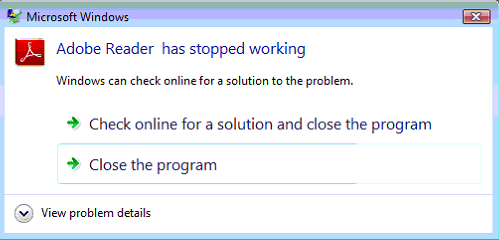
This issue has just come up, and seems to be affecting many people around the world. Adobe Reader X and XI seem to be crashing at startup, after a wait of 10 seconds or so. You’ll see the great ‘Adobe Reader has stopped working’ crash message:

adobestoppedworking

Some quick research showed that others were also experiencing this. I found a few people on Twitter complaining about similar things. @CurtinOasis said “Currently issues with adobe reader crashing on lab computers. May prevent accessing PDF docs. Investigating as a high priority! Sorry guys!” and @VillSumith “Adobe Acrobat Reader, crashing due to faulty network proxy. What’s the connection? Anyone? #adobe #techsupport #windows

One of the fixes was to either update Adobe, or reinstall – both seemed to work, but a rather poor solution for a multitude of installs.

I found this post on the Adobe Community forums: http://forums.adobe.com/thread/1283545?tstart=0 which mentioned this same issue. Ashen.NZ found that Adobe Reader was doing a request to the file http://acroipm.adobe.com/10/rdr/ENU/win/nooem/none/message.zip and blocking that URL actually fixed the issue. I confirmed this myself, checking that file came up in the network traffic logs, and then blocked the whole subdomain http://acroipm.adobe.com – and it worked.

This is by no means a proper fix, but until Adobe work out what’s going on, this will at least keep you going. I’ll update this post if I come across any further information.

Update: The Adobe forums thread above has been updated with an official comment (as pointed out by @Jacobestrin) –


Hi Everyone,

 This was a temporary glitch with our servers that has now been resolved. Please re-launch Acrobat/ Reader and let us know if you still face this issue.

 Thanks for your patience.

 Regards,

Deepak


I’ve disabled the workaround and everything seems ok. Just a slight slipup from Adobe if it was a ‘glitch’ :)

Why Bother With Lync if Skype Is Free?

Skype is free to use. Microsoft Lync costs lots of licensing money. They do the same things, so why would anyone pay for Lync?

This is the sort of question I’ve been asked more than once, from end users to high class Linux Engineers who are used to using the best fit free solution to their problem. As with most things, the choice between the two is dependent on what you want out of it.

They’re both owned by Microsoft now, and MS has started to integrate the two together. Some of the lines are starting to blur – but again, what does Lync offer that Skype doesn’t?

First, Skype is a consumer product. Lync is an enterprise product. Skype will update it’s desktop software whenever Microsoft’s severs say they’re ready. Lync will update when you tell your WSUS Server that it’s time to, after sufficient testing has been carried out. That’s the same reason nobody likes iTunes in an enterprise environment.

Lync will use your internal usernames and email addresses, while Skype needs an external Skype or Microsoft account. An I.T. Department can’t do as much to help someone who’s forgotten their username, had their account hijacked, blocked, eaten by a grue etc, while the Lync account is dependent on your Active Directory account and fully controllable (there is Skype Manager for businesses, where business accounts can be created from a CSV and some management overhead – but this is at a very basic level. See https://support.skype.com/en/faq/FA10519/what-is-skype-manager-and-how-does-it-work for further details).

Lync with Enterprise voice (with a compatible gateway) will allow you to use your existing company number range, and have Lync as your full PBX solution. Skype you have to buy a new phone number, and will be completely locked in to using Skype or losing the number. Vendor lockin is never a good thing.

Lync will fully integrate with your Exchange environment, with useful functions such as using Unified Messaging with Voicemail and sending the message back via email, conversation and call history saved back to each user’s mailbox, and fully reportable usage details via Lync’s SQL Reporting Services. Response groups for centralised numbers, simultaneous rings to multiple staff and other advanced voice functions make Lync a much fuller business product when compared to Skype.

Collaboration is much stronger in Lync too. Just being able to see if fellow staff members are available, on the phone, in a meeting, away for an hour or 24 hours automatically by their status saves everyone time. Screen sharing, whiteboards are incredibly useful extras. Both products have easily creatable multi participant calls and video chats, but at the Skype end you need to be a premium user for that function.

Lync can also host online meetings with external third parties, who only need a web browser and not a full Lync client or even a Lync account.

If you’re a complete control freak (as you should be in I.T.), you can have Lync on-premise with absolute control of your servers and the data they hold, or trade off some of the control with Office 365. Skype is a black box of mystery in regards to the server side. Redundancy, uptime and protection of data is a cross of the fingers since there’s not much else to do. If Skype ever goes down and your customers can’t contact you, you’ll have to hope someone at the Skype factory finds the right switch to flick.

There are probably other things I haven’t covered in this overview, but Microsoft Lync is an enterprise grade solution with everything you’d expect to get with that caliber of product, including the price tag.

Network Printers keep disappearing from Directory Services

Hi,

Just had an issue where some new print servers were commissioned – Windows Server 2012, with local printers installed connected to IP addresses of network based printers, and then shared and listed in the directory:

list in directoryPretty common stuff. There’s even a Technet article on how to do this http://technet.microsoft.com/en-us/library/cc737008(v=ws.10).aspx

Our problem was that after a few days, every single printer from a server would drop off the directory. We could get them back by removing and adding the tick for ‘List in the directory’ and waiting 5 minutes, but that’s a rather painful and temporary fix. You can also restart the Print Spooler service and wait as it will republish the printers, but that’s non-permanent resolution.

Doing a bit of research (yes, googling) I found an old thread here http://www.techsupportforum.com/forums/f103/solved-network-printers-disappearing-from-directory-161202.html and a similar Microsoft support article here http://support.microsoft.com/kb/246906/en-us that both indicated the easist way is to disable Printer Pruner on each Print Server via Group Policy:

pruning

As per the screenshot, the three settings you want to disable are:

Directory pruning interval
Directory pruning priority
Directory pruning retry (ok this doesn’t really matter if the top two are disabled, but no harm)

This will stop the server doing any sort of pruning – and hey, if you want to remove a printer from the directory, you remove the tickbox.

As a side note, if you’re not already using Print Management – start using it. Step by Step guide from Technet here: http://technet.microsoft.com/en-us/library/cc753109(v=ws.10).aspx

Why use Print Management? It lets you centrally manage all Network Printers, their drivers, and has a bunch of handy options like deploying to Group Policy. Trust me, it’s worth having a look! You just need to add the “Print Services” role to a server, then add the feature “Print Services Tools”.


ASUS Warranty Repair wants my Password?

Hi,

Last year I bought an ASUS laptop for my wife – an ASUS Vivobook S400CA which isn’t too badly specc’d with a small SSD drive and touchscreen. All seemed OK, apart from a somewhat dodgy spacebar that had to be pressed rather hard. We lived with that for a while, but got fed up so decided to log a fault on it.

I first started with calling the place of purchase – JB Hifi, who said I had to go to the manufacturer (I don’t *believe* they can legally say this under Australian Consumer Law, but that’s an aside issue) so I contacted Asus. I gave them all the necessary details, and was told I’d be contacted by the local Asus Repair Centre. A few hours later they called me, and said instead of posting it in, I could drop it off – fine by me as it was just down the road.

Upon arriving at the Asus Repair Centre, I am given more paperwork to fill out. It’s become obvious that this isn’t actually Asus, but a company that does work on their behalf. Again, no issue here as long as someone’s fixing the laptop. One of the fields on the paperwork asks for a ‘Password’. I query the person at the counter on this, asking why they need such a detail, especially since this is a faulty spacebar… and even if they really need to test it, the login screen will let them try.

The response was that because they did work on behalf of Asus, they had to test everything and give it a tick of approval, otherwise people will bring back their items with other faults and Asus has to keep paying this company each time that occurs. I can understand where they’re coming from, but they don’t need to log into my personal installation of Windows to do this surely? They said it was a necessity and they couldn’t accept the laptop without it.

I immediately logged in, created a temporary account with as little access as I could, and gave them the details. There wasn’t anything personal on this laptop that I knew of, but it’s still a worrying state.
I’m sure many of you will read this and just shake your heads, but here’s some reasons as to why this is bad practise:

  1. Giving them access to the laptop means they can easily go through it’s contents. Unless you’re computer savvy, you’re going to have little idea what access they actually have by handing over a login.
  2. These laptops run Windows 8 – Microsoft promotes the use of a Microsoft account for login. This login doesn’t just give local access to the laptop, but any service connected to the Microsoft account – Xbox, Hotmail/Outlook.com, Skype, SkyDrive – scary stuff.
  3. Someone logging a warranty claim should be told that this is a requirement before you turn up and get asked for credentials.
  4. When is it ever a good idea to write down your password on a piece of paper and hand it to a stranger?

I’m not sure if this is Asus’s own process, or just a process this particular 3rd party uses – but either way, this is something they should reconsider their policies and method. My recommendation would be for them to boot off a USB or CD to run diagnostics on the hardware, simple.

Note: I sent a tweet to Asus’s Australian twitter account @ASUSAU for comment but did not hear back. If I do hear anything, this article will be updated.